make preferable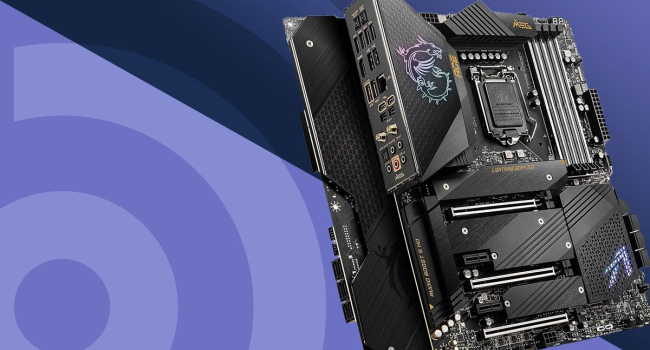
A motherboard is the “nervous system” of any computer. Without it, the processor, memory, graphics card, and storage devices simply cannot communicate with each other. Essentially, it is a multilayer printed circuit board that hosts all the key controllers, connectors, and buses that link components into a single working system.
What the Motherboard Does
- Enables data exchange between all system components.
- Supplies power to the processor, memory, and other devices.
- Coordinates peripherals (USB, audio, networking, Bluetooth).
- Stores and runs BIOS/UEFI firmware (system startup and initial configuration).
- Determines which CPUs, memory types, and expansion cards are supported.
Main Components of a Motherboard
- CPU socket — the slot where the processor is installed (LGA for Intel, AM5/AM4 for AMD, TR4/sTRX4 for HEDT).
- Memory slots (DIMM) — usually 2 or 4, rarely 8 (servers). Modern boards support DDR5-4800 up to 8400+ MHz.
- Chipset — the “brain” of the board. Usually a single chip (Intel PCH, AMD chipset). Handles PCIe lanes, SATA/NVMe, USB, networking, and more.
- PCIe expansion slots — x16 for GPUs, x4/x1 for NVMe adapters, sound cards, Wi-Fi cards.
- Power connectors — 24-pin ATX plus 8/4-pin EPS12V for the CPU, sometimes extra 6/8-pin connectors.
- 2 slots — for fast NVMe SSDs (up to PCIe 5.0 x4 ≈ 15,000 MB/s).
- SATA ports — for traditional SSDs and HDDs.
- VRM area (CPU power delivery) — the stronger and cooler it is, the better for stability and overclocking.
- BIOS/UEFI chip — flash memory containing the firmware.
- Audio codec and network controller — typically Realtek or Intel.
- RGB controllers and diagnostic indicators — Q-LEDs, POST codes, etc.
Types of Motherboards by Purpose
Gaming
- Features: reinforced power delivery, PCIe 5.0 x16 + x4, multiple M.2 slots, DDR5 up to 8000+ MHz, RGB
- Chipsets (2025): Z890, Z790 (Intel); X870E, X870, B850 (AMD)
- For: gamers, streamers, overclocking enthusiasts
Professional / HEDT
- Features: 8–16 RAM slots, up to 128 PCIe lanes, ECC support, one or more CPUs
- Chipsets: Intel W790, AMD TRX50 / WRX90
- For: rendering, scientific computing, servers
Office / Budget
- Features: 2 RAM slots, PCIe 4.0, minimal M.2, simple cooling
- Chipsets: B860, H810 (Intel); B850, A820 (AMD)
- For: office work, study, multimedia
Compact
- Features: Mini-ITX form factor, low power consumption, often passive chipset cooling
- Chipsets: B760I, A620I (Intel); B650I, A620I (AMD)
- For: HTPCs, mini PCs, embedded systems
Server / Workstation
- Features: ECC support, IPMI, 10G LAN, up to 24 cores per socket
- Platforms: Intel C741, AMD SP5 / SP6
- For: data centers, render farms
Main Form Factors (Sizes)
- E-ATX — 305 × 330 mm, up to 7–8 PCIe slots, 8 RAM slots, large full-tower cases
- ATX — 305 × 244 mm, up to 6–7 PCIe slots, 4 RAM slots, standard mid/full towers
- Micro-ATX — 244 × 244 mm, up to 4 PCIe slots, 4 RAM slots, compact mid-towers
- Mini-ITX — 170 × 170 mm, 1 PCIe slot, 2 RAM slots, mini cases and SFF builds
- Mini-DTX — 203 × 170 mm, up to 2 PCIe slots, 4 RAM slots, niche compact builds
Key Specs to Consider When Choosing (2025)
- Socket — LGA1851 (Intel 15th/16th gen), AM5 (Ryzen 7000–9000+).
- Chipset and PCIe 5.0 support — important for RTX 5090 and Gen5 SSDs.
- Number and speed of M.2 slots — ideally at least 1× PCIe 5.0 plus 3× PCIe 4.0.
- VRM quality and phase count — 10+ phases for Ryzen 9 / Core i9 overclocking.
- DDR5 support and max frequency — 8200–8400+ MHz on top Z-series boards.
- USB connectivity — USB4 / Thunderbolt 4, USB 3.2 Gen2x2 (20 Gbps).
- Networking — at least 2.5G LAN; 5G/10G for premium boards.
- Wireless — Wi-Fi 7 and Bluetooth 5.4 (often marked with “-WiFi”).
In Short
The motherboard is the foundation of any PC, defining compatibility, upgrade potential, and overall system performance. In 2025, the main trends are a full shift to DDR5 and PCIe 5.0, powerful VRMs for overclocking, built-in Wi-Fi 7 and USB4, and Mini-ITX boards that rival full-size ATX in performance. When choosing a motherboard, focus first on the CPU socket and chipset—everything else should follow your needs and budget.