make preferable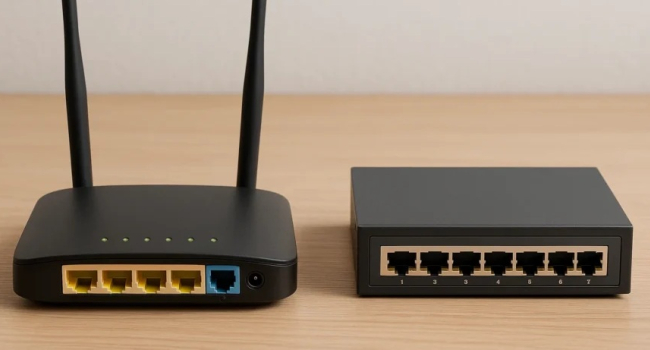
At home, most of us have one “black box” with antennas that we call a router. In reality, there are several similar devices with different names, and it’s easy to get confused. Here’s a simple breakdown.
|
Device |
What it does |
Assigns IP? |
Connects to provider? |
Wi-Fi? |
When needed at home? |
|
Router (маршрутизатор) |
Main network brain |
Yes (via DHCP) |
Yes |
Usually |
Always — it’s the core device |
|
Switch (коммутатор) |
Connects wired devices inside a network |
No |
No |
No |
When you need many wired ports (PC, TV, console) |
|
Access Point (точка доступа) |
Provides Wi-Fi, doesn’t get internet itself |
No (unless in router mode) |
No |
Yes |
To expand Wi-Fi coverage or convert wired network to wireless |
|
Wi-Fi Extender (репитер) |
Repeats existing Wi-Fi |
No |
No |
Yes |
To boost signal in distant rooms |
- Router = the main brain
The router connects to the internet from your provider (cable or SIM), creates a home network, assigns internal IPs, and manages traffic between devices. Modern routers almost always have built-in Wi-Fi, which is why we often call them Wi-Fi routers. Without a router, no internet at home.
- Switch / Network Switch
A switch only connects devices within an existing network. It sends data to the correct device using MAC addresses (unlike an old hub, which broadcasted to all).
Example: Your router has 4 LAN ports, but you want to connect 8 devices (PC, NAS, console, TV). Add an inexpensive 8-port switch — problem solved.
- Access Point (AP)
An access point is basically a Wi-Fi module without brains. It connects via cable to the router and broadcasts wireless. Useful for:
- Converting a wired network to wireless (office, cabin).
- Expanding Wi-Fi coverage in large homes (connect AP with cable to a far room).
- Wi-Fi Extender / Repeater
Catches the existing Wi-Fi and rebroadcasts it.
Downside: Speed usually drops by half because one radio handles both receiving and sending. Convenient when you can’t run a cable to an access point.
- Mesh Systems
Several “smart” routers working as one network. Your device switches between nodes seamlessly (seamless roaming), speed stays high, network picks the best channel. Best solution for large homes, but more expensive.
Home Recommendations (2025)
- Apartments up to 80–100 m² → One Wi-Fi 6/6E router is enough.
- Apartments 100+ m² or thick walls → Mesh system with 2–3 modules (TP-Link Deco, Xiaomi AX, Asus ZenWiFi).
- Need many wired connections → Router + inexpensive gigabit switch (5–16 ports).
- Boost signal in one room without wires → Any Wi-Fi extender (₽1500–3000) or an AP via cable.
In Short
- Router: the main conductor — gets internet and shares it with all devices.
- Switch: only wired expansion of your existing network.
- Access Point & Extender: increase Wi-Fi coverage but can’t get internet by themselves.
- Mesh: premium “router + multiple APs” working together without breaks.
Now you know exactly which device solves your specific home networking task.