


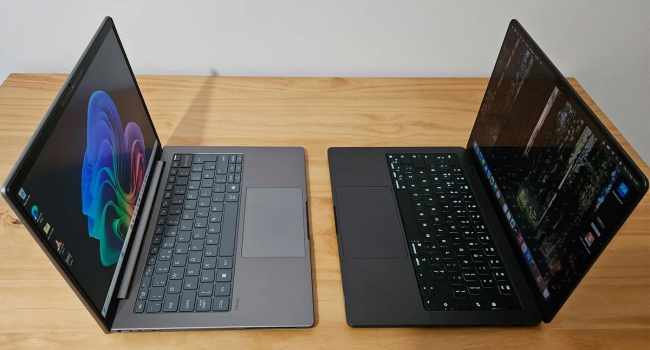
MacBook or Windows laptop: Which is better for astrophotography?
Astrophotography demands more from a laptop than just raw power. Stability, a high-quality display, and the ability to work comfortably with large volumes of data are just as important. Modern telescopes and cameras capture high-resolution images, and processing tasks such as stacking, noise reduction, and color correction can take hours. Choosing between a MacBook and a Windows laptop depends on budget, preferred software, and specific workflows. Let’s break down which option is better suited for astrophotography.
Performance: where MacBook leads and where Windows wins
According to Space.com, Apple’s M-series chips (M4, M5) do outperform most Windows processors in energy efficiency and single-core performance. In benchmarks, the M5 shows results roughly a generation ahead of Intel Panther Lake or AMD Ryzen AI processors in 2026. This is especially noticeable in tasks that rely on fast single-core performance, such as RAW processing in Lightroom, exporting in Photoshop, and basic stacking in DeepSkyStacker.
In heavily multi-threaded workloads, however, the gap narrows. Qualcomm’s Snapdragon X Elite with 12 cores is already close to the M4 in multi-core performance, while high-end Windows laptops with Nvidia RTX 5080 or AMD Radeon RX 8000M graphics easily outperform any MacBook in GPU tasks, by three to four times in rendering or CUDA-accelerated workloads, for example in PixInsight or Siril.
Conclusion: if you work mainly with Adobe apps, Affinity Photo, and light stacking, a MacBook, especially a Pro with M5, will be faster and quieter. If you rely on GPU acceleration or heavy astronomy software, a Windows laptop with a discrete GPU will offer a clear advantage.
Display and color accuracy: a critical factor for astrophotography
This is where MacBook traditionally excels. Retina displays, especially the Liquid Retina XDR panels in Pro models, offer excellent factory calibration, full DCI-P3 coverage, high brightness, and strong contrast. This is crucial when processing faint nebulae and galaxies, where even small errors in color or tonal gradients can ruin an image.
Windows laptops also offer OLED and mini-LED displays with full DCI-P3 coverage, but quality varies greatly by model. Top-tier options such as the Samsung Galaxy Book5 Pro, ASUS Zenbook 14 OLED, and Lenovo Yoga Pro 9i come very close, but in the midrange segment color accuracy is often worse. In addition, MacBooks tend to maintain more consistent calibration without manual adjustment.
Software compatibility: where more tools are available
Astronomy software has historically been better supported on Windows. PixInsight, Siril, DeepSkyStacker, N.I.N.A., APT, Stellarium, Cartes du Ciel, and PHD2 Guiding are either native to Windows or run more reliably there. On macOS, many of these tools require Parallels, Wine, or Rosetta 2, which can reduce performance or introduce bugs.
On the other hand, Adobe Lightroom and Photoshop, Capture One, and Affinity Photo run extremely well on macOS, often faster than on Windows. If your workflow is built around Adobe software, a MacBook is usually more convenient.
Battery life and portability
MacBooks, especially the M5 MacBook Air, set the benchmark for battery life. They can deliver up to 18 to 20 hours in light tasks and around 10 to 12 hours during photo processing. This is critical for trips to dark locations without access to power. Windows laptops with discrete graphics typically last only 5 to 8 hours at best.
MacBooks are also quieter, often completely silent, lighter, and generally more robust in build quality. Windows laptops have one main advantage here: a wider selection of ports and, in some cases, upgrade options, although these are limited in ultrabooks as well.
Price and value
The MacBook Air M5 is one of the best options in the 1200 to 1300 dollar range, offering an excellent display, long battery life, and enough performance for most astrophotography tasks. The MacBook Pro M5 Pro or Max is aimed at heavy stacking and video work, but prices start at around 2000 dollars and higher.
Windows offers more flexibility in the midrange. For 800 to 1200 dollars, you can find laptops with 32 GB of RAM, a good OLED display, and discrete graphics, for example from ASUS, Lenovo, or Dell. At the same price, a MacBook will generally be weaker in GPU performance.
In brief
For astrophotography in 2026, a MacBook, especially an Air or Pro with M5, is the best choice if you work primarily in Adobe software and value battery life, quiet operation, and excellent out-of-the-box color accuracy. A Windows laptop is the better option if you use specialized astronomy software such as PixInsight or Siril, need a powerful discrete GPU for acceleration, or want to save money. A budget up to 1300 dollars favors the MacBook Air M5. For budgets above 2000 dollars and heavy stacking, the MacBook Pro M5 Pro or Max makes sense. In the midrange segment, Windows laptops with good displays and GPUs offer the best value. The most important step is to verify compatibility with your core software before buying.
- Related News
- Which MacBook to buy in 2026: A guide to all models
- Why fast charging accelerates battery wear in smartphones and laptops
- Enthusiast turns Google Pixel 9 into a full-fledged laptop with 3D printing
- Apple to raise device prices due to memory shortage
- Why laptop manufacturers are massively returning to 8 GB of RAM
- Apple turns manufacturing defects into profit: how the company uses “defective” processors
- Tech Jobs
- Most read
month
week
day
- From Excel to AI: A startup by specialists who relocated from Iran to Armenia helps businesses make sense of their data 632
- The anniversary iPhone 20 will be as thin as the Air: what the insider revealed 612
- How NASA's primary training centre is changing in the era of commercial space stations 574
- Top flagships of August 2026: Experts name the five best smartphones 555
- Why Bill Gates is no longer an AI optimist: Three major threats of AI 545
- Robot knocks out teeth of five year old girl: Incident at Chinese museum leads to lengthy compensation dispute 541
- 10,000 tiny probes to Saturn's rings and robots in lunar caves: NASA funds 18 visionary ideas 482
- How to make your new smartphone more secure: expert tips 475
- Apple prepares to raise iPhone prices following Samsung and Google 462
- "Dark photons" back in play: scientists revise constraints on dark matter 460
- Archive