


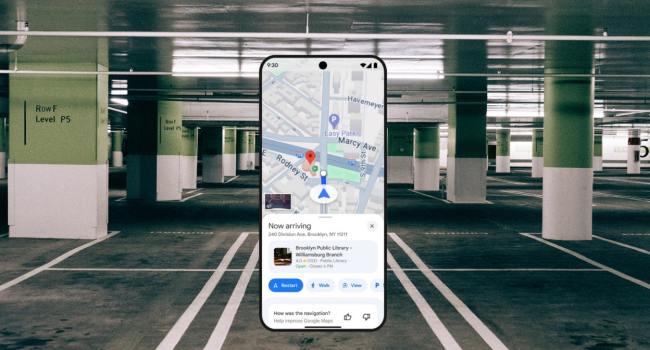
A new useful feature: Google Maps on iOS can now automatically remember where you parked
Google has quietly but very effectively improved one of the most requested features in Maps: the app has learned to automatically save the spot where you left your car. And it does this without a single tap — simply because your phone was connected to the vehicle.
How It Works
If your iPhone was connected to the car via Bluetooth, USB, or CarPlay during the trip, and Google Maps was running (even in the background), then when you stop, the app will automatically place a parking marker. A familiar icon will appear on the map, but now with your personal car symbol (which can be chosen in the settings) instead of a plain “P”. The marker remains for 48 hours and disappears as soon as you start driving again.
Google Maps senior product manager Rio Akasaka confirmed the update on LinkedIn: the feature began rolling out to iPhone users about a month ago and is already active for most of them.
Why This Is Especially Convenient on iOS
Android had a similar feature before, but the marker had to be removed manually. On iPhone everything now happens automatically: you park — the marker appears, you drive away — it is removed. No extra actions needed.
Where It Is Available
So far, only in the iOS version of Google Maps (iPhone and iPad). The enhanced automation has not yet arrived on Android, but it will likely appear in upcoming updates.
Summary
Google Maps for iOS can now automatically add and remove a parking marker if the phone was connected to the car via Bluetooth or CarPlay. The marker stays for 48 hours and uses your custom car icon. The feature is already available for most iPhone users — and it may be the most genuinely useful small improvement in recent months for anyone who has ever tried to find their car in a huge parking lot.
- Related News
- WhatsApp to introduce full passwords instead of PIN codes
- Google now forces a 24-hour wait before APK installation: Android’s new defense against malware
- Expert explains why smartphone storage quietly fills up
- WhatsApp may soon automatically sort business messages into a separate folder
- What are some lesser-known ways to clear storage on Android smartphones?
- A full-fledged DLSS equivalent is coming to smartphones
- Tech Jobs
- Most read
month
week
day
- DeepSeek or ChatGPT: Which is better in 2026? 1229
- Cosmonaut Harutyun Kiviryan passes pre-flight exam on ISS simulator 703
- Anthropic teaches AI to control real-world machines 683
- Scientists have learned to transmit data by laser through atmospheric disturbances 677
- Beijing opens "Kindergarten" for robots: Machines learn from their own mistakes 661
- BepiColombo begins arrival at Mercury after nearly eight years of flight 656
- What will happen to the human body on Mars? 643
- Do white holes exist, and what does the Big Bang have to do with it? 612
- Dark matter detector captures the weakest neutrinos ever detected 589
- What Claude can do: A complete overview of one of the most popular AI assistants 587
- Archive